
Introducing the Reechee MCP Server
One URL turns Claude or Codex into a competitive research assistant with live data from software review platforms behind it.


Ask your AI assistant what users complain about in HubSpot, Zendesk, DocuSign - any B2B software product - and it'll give you a solid answer. What it can't do on its own is read hundreds of real reviews, filter out the noise, and tell you what actually recurs, with a source on every claim. The Reechee MCP server gives your agent exactly that.
What can you ask?
Point any MCP client at https://mcp.reechee.io/mcp (no signup, no key - the URL is the whole setup).
From there, your assistant can answer questions like:
- "What are the top complaints about Monday.com right now?"
- "Who competes with Intercom, and what do their users complain about?"
- "Which CRM in this list has the worst onboarding complaints?"
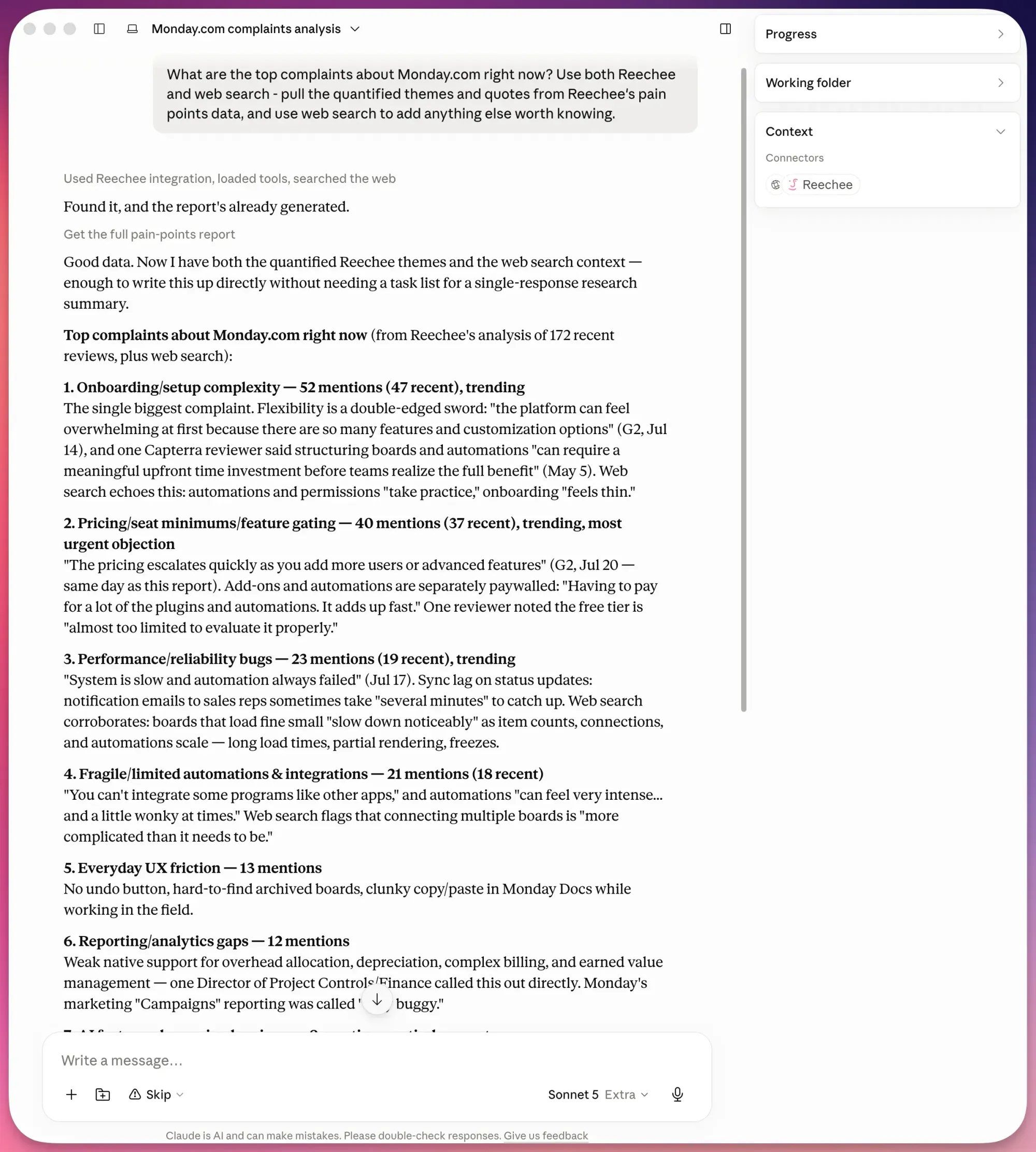
All of this runs over MCP (Model Context Protocol), the open standard AI assistants use to reach live tools and data. Claude, Codex, and most serious AI clients can be easily set up with MCP. The Reechee MCP server is the same review intelligence that powers Opportunity Alerts and Pain Points Reports in the app, served over that standard.
Guest access is rate-limited per IP at 15 requests a minute and 100 a day, which is plenty for research. Guest answers show each report's top three themes with two quotes each. The full report comes with a paid Reechee account.
What does a paid account add?
If your team is on a paid Reechee plan (the 30-day free trial counts), point your client at https://mcp.reechee.io/mcp/auth instead (no need to paste a key or edit a config file). It walks you through a normal browser login and consent screen - the same OAuth flow you know from connecting any two apps.
Once connected, your assistant works with your actual account:
- Pull full Pain Points Reports: every theme, every quote, not just the top-three taste.
- List your newest Opportunities, filter them, mark them viewed.
- Manage your Watchlist - follow and unfollow products from a chat.
- Check your credit balance and account status before doing anything that costs credits.
When you approve an optional credit budget on the OAuth consent screen, the credit-spending tools become enabled too:
- Unlock reviewer contacts
- Reveal a Buying Committee
- Generate pain points report
- Draft personalized sales pitches
Leave the budget empty and your assistant cannot spend credits at all. Your credit balance is the real floor, so nothing spends past what you actually hold. Every connection is visible and revocable in Settings, under Connected apps.
Connecting works from any account, but the depth follows your plan - learn more here: docs.reechee.io/guides/free-vs-paid.
If you're building a GTM engineering practice, this is what it looks like day to day: the signals stay in one system, and your agents reach them from wherever you already work.
What about the REST API?
The MCP server is a thin layer over a documented REST API at app.reechee.io/api/v1. Paying users can create API keys in Settings, each with its own spend cap, and build directly: search products, pull reports, list Opportunities, manage the Watchlist, trigger unlocks. Responses come back in a clean JSON envelope, and the full reference lives at docs.reechee.io/api-reference.
Webhooks are how Reechee pushes data out to your stack. The API is how your stack reaches back in.
How do you set it up?
Setup takes about two minutes:
- Open your MCP client's server settings (Claude: Settings, then Connectors. VS Code: the MCP panel).
- Add
https://mcp.reechee.io/mcpfor Guest access, orhttps://mcp.reechee.io/mcp/authto connect a paid account. - Ask something. "Use Reechee to check what users hate about [your biggest competitor]" is a good first question.
- Recommended thing to try for paid users: "What are my latest opportunities from Reechee?".
Step-by-step guides for each MCP client are at docs.reechee.io.
Why we built it
Reechee has always been about one idea: real, articulated customer frustration is the best buying signal in B2B SaaS. That's Frustration-Led Growth, and until now, acting on it meant coming to our dashboard.
But your team increasingly works inside AI assistants, and those assistants are only as good as the buyer intent data they can reach. Giving them direct access to the frustration data - freely, at a taste level, for anyone - felt like the obvious next move. The people who ask "what do users hate about my competitor" and get a real answer are exactly the people who'll want the alert the moment a new frustration appears.
Guest access is open right now - paste the URL and ask your agent what it can do with Reechee. And if you want the full reports and the alerts, start a 30-day free trial.